Official Papua New Guinea Platform
PNG Safe App
Your Safety, Our Priority –
Stay protected anytime, anywhere in Papua New Guinea with real-time emergency alerts, live location tracking, and instant secutiy services.
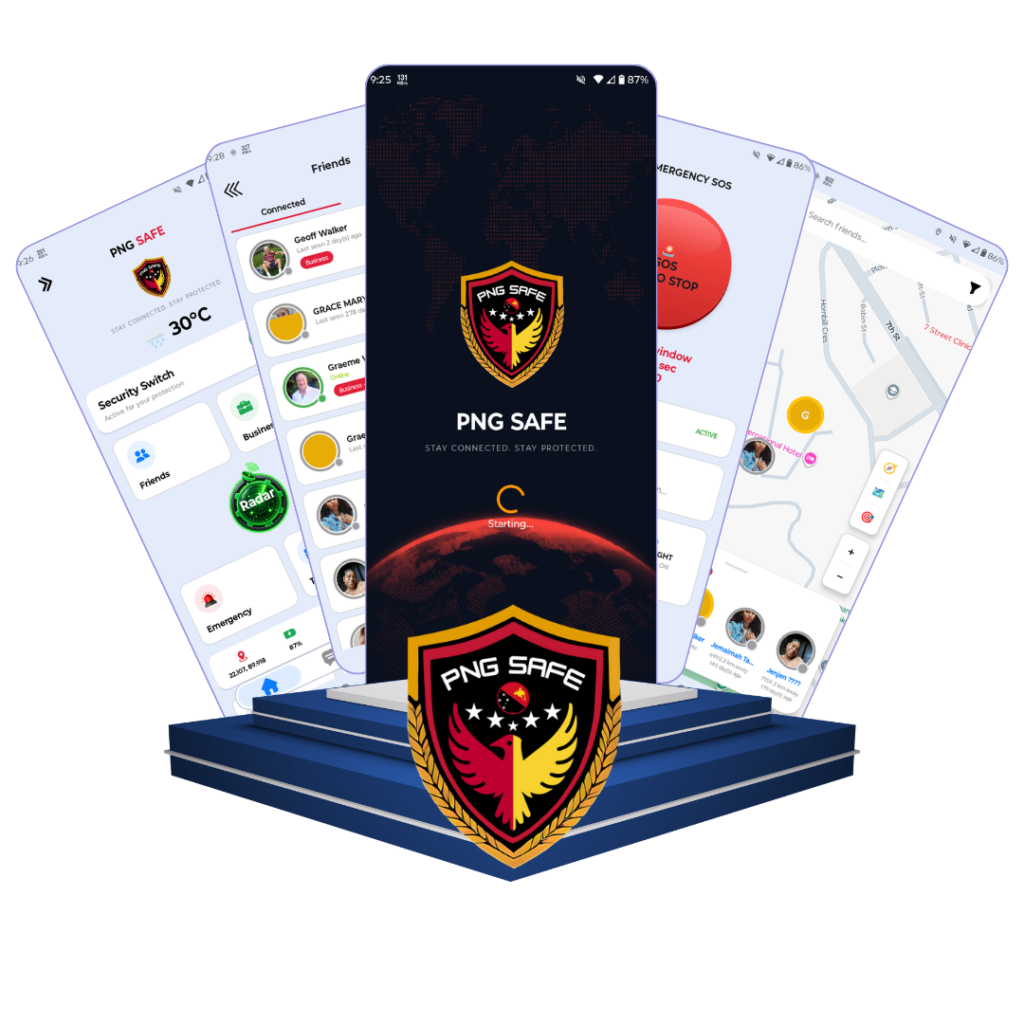
PNG Safe App Features
Engineered specifically for Papua New Guinea to ensure personal protection, vehicle anti-theft, live location sharing, and corporate employee safety.
One-Tap Emergency SOS & Widget
Trigger instant emergency broadcasts with exact GPS coordinates. Add the SOS Widget to your home screen for immediate panic alerts.
Live Map & Radar Sweep
View real-time movements of trusted friends, family, and employees anywhere in Papua New Guinea.
Coming Soon
Anti-Theft & Vehicle Protection
Protect vehicles, Smart Tags, and valuable assets with alerts on unauthorized movement or SIM changes.
Circles of Safety
Connect with your inner circle. View live battery levels, signal strength, and online status.
72-Hours Travel & Route History
Review full travel routes taken over the last 24 hours for safety audits and field visit verification.
Business Hub & Corporate Connect
Verified company directory, staff management, role permissions, and company-wide emergency broadcasts.
Our Purpose & Commitment
Our Mission & Vision
We are dedicated to building a safer, more technologically empowered Papua New Guinea by combining personal safety technology with enterprise digital solutions.
Our Mission
To empower every citizen and business in Papua New Guinea with reliable, accessible technology. We provide instant emergency safety protection for families while equipping local enterprises with world-class web development, security, and digital infrastructure to drive sustainable growth.
Our Vision
To become Papua New Guinea’s most trusted digital ecosystem and safety network. We envision a future where PNG businesses thrive online without technical friction, and every community stays seamlessly protected through real-time technology.
Enterprise Tech Solutions
For PNG Businesses
We help companies, startups, and organizations in Papua New Guinea build, secure, maintain, and redesign high-converting digital products.
Web Development
Your 24/7 digital salesman. We build modern, lightning-fast, mobile-responsive websites tailored for businesses operating in Papua New Guinea. Includes custom corporate sites, e-commerce, PNG mobile network optimization and local SEO.
- Custom Corporate & Business Websites
- E-commerce & Payment Gateway Setup
- High Speed & PNG Mobile Network Optimized
- Local SEO & Google Search Indexing
Website Security
Protect your hard work from cyber criminals and hackers. Enterprise firewalls, malware removal, SSL security, vulnerability audits and automated daily cloud backups.
- Complete Malware & Virus Cleanup
- Real-time Web Application Firewall (WAF)
- Vulnerability Audit & Security Patching
- Automated Daily Cloud Backups
Website Maintenance
Zero technical stress for your business. We manage core updates, bug fixes, server health monitoring, content updates and priority emergency WhatsApp support.
- 24/7 Server Uptime & Speed Monitoring
- Monthly Core & Security System Updates
- Content Edits, Image & Price Updates
- Priority Emergency WhatsApp Support
Website Redesign
Give your old or slow website a modern UI/UX makeover. Customer-focused design, page speed and mobile performance boost, seamless content migration.
- Modern Clean UI/UX Design Makeover
- Page Speed & Mobile Performance Boost
- PNG Trust Mark Integration
- Seamless Database & Content Migration
App Development
Stay directly on your customer’s phone screen. Native Android & cross-platform apps, GPS tracking, push notifications, Firebase & enterprise REST APIs.
- Native Android & Cross-Platform Apps
- GPS Map, Tracking & Push Notifications
- Firebase & Enterprise REST APIs
- Direct APK / Store Deployment
Digital Strategy & Growth
Strategic tech guidance for companies expanding in PNG: domain & cloud hosting, corporate email setup, business directory verification, dedicated account manager.
- Business Domain & Cloud Hosting
- Professional Corporate Email Setup
- Business Hub Directory Verification
- Dedicated Tech Account Manager
PNG Safe App Subscription Plans
Choose the right safety plan for your personal needs, family, or business in Papua New Guinea Kina (PGK).
Basic Safety
FREE PLAN
/forever
Essential personal safety features for every PNG citizen.
- Up to 2 Safety Friends
- 1 Emergency SOS alert / day
- 20 Messages / day
- Live GPS Location Sharing
- Basic Radar Sweep
Recommended Family
GOLD PLAN
/Monthly
Extended circle of safety for families and active individuals.
- Up to 7 Safety Friends
- 5 Emergency SOS alerts / day
- 200 Messages / day
- 24-Hour Travel & Route History
- Anti-Theft & SIM Change Alerts
- Home Screen SOS & Weather Widgets
Ultimate Business Protection
PLATINUM PLAN
/Monthly
Maximum capability for executives, business owners & large groups.
- UNLIMITED Safety Friends
- UNLIMITED Emergency SOS alerts
- UNLIMITED In-App Messaging
- Full Vehicle & Smart Tag Tracking
- Business Hub Directory Listing
- 24/7 Priority Emergency Support
Ultimate Business Protection
PLATINUM PLAN
/Monthly
Maximum capability for executives, business owners & large groups.
- UNLIMITED Safety Friends
- UNLIMITED Emergency SOS alerts
- UNLIMITED In-App Messaging
- Full Vehicle & Smart Tag Tracking
- Business Hub Directory Listing
- 24/7 Priority Emergency Support
Ultimate Business Protection
PLATINUM PLAN
/Monthly
Maximum capability for executives, business owners & large groups.
- UNLIMITED Safety Friends
- UNLIMITED Emergency SOS alerts
- UNLIMITED In-App Messaging
- Full Vehicle & Smart Tag Tracking
- Business Hub Directory Listing
- 24/7 Priority Emergency Support
Ultimate Business Protection
PLATINUM PLAN
/Monthly
Maximum capability for executives, business owners & large groups.
- UNLIMITED Safety Friends
- UNLIMITED Emergency SOS alerts
- UNLIMITED In-App Messaging
- Full Vehicle & Smart Tag Tracking
- Business Hub Directory Listing
- 24/7 Priority Emergency Support
Ultimate Business Protection
PLATINUM PLAN
/Monthly
Maximum capability for executives, business owners & large groups.
- UNLIMITED Safety Friends
- UNLIMITED Emergency SOS alerts
- UNLIMITED In-App Messaging
- Full Vehicle & Smart Tag Tracking
- Business Hub Directory Listing
- 24/7 Priority Emergency Support
Direct Distribution Platform
Download Official PNG Safe APK
This application is distributed directly via our official website for rapid deployment, emergency updates, and hassle-free access across Papua New Guinea.
File Size: ~18 MB | Version: 1.0.0 | Compatible with Android 7.0 & Above
Easy Setup Guide
How to Install PNG Safe App
Installing the app outside of Google Play Store is quick and safe. Follow these 3 simple steps.
1. Download the File
Tap the “Download PNG Safe APK” button above. The .apk file will save to your phone’s Downloads folder.
2. Enable Installation Permission
If Android prompts “Install unknown apps,” go to Settings and switch ON “Allow from this source.”
3. Complete Install & Launch
Tap “Install,” wait a few seconds, then open PNG Safe and register your free account.
Help & Support
Installation Troubleshooting & FAQ
Encountering an issue during APK download or installation? Here are the simple solutions to common Android installation errors.
This usually happens if you have an older version of PNG Safe installed. Uninstall the old version, clear your browser’s download cache, ensure at least 100 MB free storage, and reinstall.
When installing APKs outside the Play Store, Android shows a standard warning. Tap “More details” then “Install anyway” to proceed — PNG Safe is 100% clean and verified.
Battery optimization can pause background GPS apps. Go to Settings > Apps > PNG Safe > Battery and select “Unrestricted.”
To allow the SOS Widget to open over other apps, go to Settings > Apps > Special App Access > Display over other apps and enable it for PNG Safe.
Direct distribution lets us roll out critical security patches and emergency features instantly without store review delays.
Get In Touch
Ready to Elevate Your Digital Presence in PNG?
Whether you need a custom website, malware security cleanup, site redesign, or corporate safety consultation, our expert team in Papua New Guinea is ready to help.
- WhatsApp Support: +880 1893 543 267
- Service Region: Port Moresby & All Provinces of PNG
- Response Time: Instant Chat via WhatsApp
Request Free Tech Consultation

Papua New Guinea’s premier digital tech solutions provider and personal safety ecosystem.
Digital Tech Services
- Web Development
- Website Security
- Website Maintenance
- Website Redesign
- Custom App Development
PNG Safe App
- Emergency SOS & Widget
- Live Map & Radar
- Anti-Theft Protection
- Subscription Plans (PGK)
- Direct APK Download
Support & FAQ
- Instant WhatsApp Chat
- Installation Troubleshooting
- Free Tech Consultation
© 2025 PNG Safe . All rights reserved. | Developed by Nayem Khan